


Nanit
3.83.02K Reviews
App Specs
- Version
- 4.78.0
- Updated On
- License
- Free
- Downloads
- 500,000+
- Developer
- Nanit
- Categories
- Parenting
- Platform
- Android, iOS
Screenshots
 Analysis by AppCompare
For a first-time parent, the hardest part of a baby monitor is often not opening the app; it’s knowing what to do with the information once it is open. Nanit is best approached as the companion to Nanit’s camera, bringing a nursery view and sleep-related tools together. I’d think of it as a way to check in and notice patterns, not as a substitute for being in the room or for professional advice.
That distinction matters because a connected monitor can make nighttime feel more manageable, but it can also encourage constant checking. Before getting started, I’d decide what you actually want help with: a quick look at the nursery, a way to hear when your baby needs attention, or a clearer record of sleep. Having one practical goal makes the app easier to use without turning every brief sound or movement into a reason to worry.
What to expect from a camera-linked parenting app
Nanit is a free parenting app from Nanit, with a 4.0 average from around 10,000 ratings and more than 100,000 installs. It is rated for Everyone, though its intended use is clearly for parents and caregivers. The app first appeared in 2016, and version 4.54.0 is the current release. The important point for a new user is that the app’s usefulness depends on having a compatible Nanit camera; it is not simply a standalone sleep diary you can use with any monitor.
That makes it a different proposition from a basic audio monitor or a camera app that only lets you view a live feed. Nanit combines monitoring with sleep tracking and related guidance, so it may suit parents who want both a live check-in and a way to review routines over time. If all you need is occasional sound monitoring, a simpler option may be less expensive and less involved.
The app is free to download, while in-app purchases range from about $70 to $350 per item. I’d factor that into the decision before building a routine around its tools: the overall cost can depend on what you choose to buy, not just on installing the app. If you already own Nanit equipment, the app may be the natural way to use it; if you’re starting from scratch, compare the camera and purchase costs with what you genuinely expect to use.
Setting it up without making bedtime harder
First things first, setting up Nanit is as smooth as a baby’s bottom. Downloading the app is a piece of cake, available on both Android and iOS. Once you've got it, you'll need to pair it with the Nanit camera. The app guides you through this process, holding your hand every step of the way, which is exactly what I needed after a sleepless night.
For a calmer first setup, I’d do the pairing during the day rather than right before bedtime. That gives you room to follow the on-screen steps, check that you can reach the camera view, and learn where alerts and sleep information appear while nobody is waiting on you to settle them. If another caregiver will use the monitor, it also helps to agree on who is checking it and when, rather than having two people react to the same notification.
Worth Reading Before You Choose

EA SPORTS FC Mobile 26 Is a Bigger Football Game, but It Takes Time

Flipboard Shows What News Apps Must Do Beyond the Feed

Switching to Android Auto Means Rethinking Your Driving Routine

Google Calendar Makes a Crowded Week Easier to Manage

Ludo King Makes the Most of the Minutes Between Plans

Baby Panda World Brings Quick Play to Modern Phones, but Its Game Library Feels Busy
The camera itself is sleek and modern, blending seamlessly into any nursery decor. But what truly sets this app apart is how it integrates with the camera to deliver personalized sleep insights. It’s like having a sleep scientist on your team, minus the intimidating jargon.
One useful habit is to treat the first few nights as a familiarization period, not a test of whether your baby is sleeping “well.” Look at how the app presents the information, but don’t rush to change a routine based on a single night. Babies’ sleep can vary, and a tracking view is most useful when it helps you ask a sensible question over time, such as whether naps are shifting or bedtime has become less predictable.
The first useful check-in
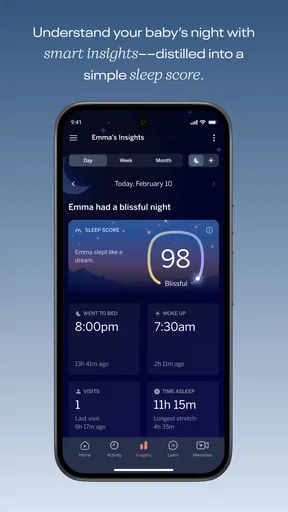
The moment you start using Nanit, you’ll notice it’s not just another baby monitor. It’s packed with features designed to ease the minds of anxious parents. The sleep tracking functionality is top-notch. It monitors your baby’s sleep patterns and provides detailed reports. I found this incredibly useful for understanding my little one’s sleep schedule (or lack thereof).
For a first meaningful success, I’d keep it simple: use the camera view to check the nursery when you’re elsewhere in the home, then see whether the sleep information helps explain a pattern you have already noticed. For example, if a nap seems shorter than usual, a later review may help you put that moment in context instead of relying on a tired guess. The value is not a perfect answer; it is having a clearer record to discuss with another caregiver or use when planning the next day.
One of my favorite features is the real-time sound and motion alerts. Imagine being in the kitchen and getting a notification that your baby is stirring. It's like having eyes on the back of your head, but way cooler.
There’s also the two-way audio, which allows you to soothe your baby without having to tiptoe into the nursery. Just hearing your voice can be all it takes to settle them down. Trust me, it’s a game-changer.
A practical trade-off is that alerts can interrupt you when you are busy, so it is worth learning which notifications are useful for your household rather than treating every one as urgent. A monitor can tell you that something has changed; it cannot make the judgment call for you. I’d use the audio and video as ways to check what is happening, then respond according to your baby’s needs and the safe-sleep guidance you already follow.
Making the information useful over time
I’d use this section to think about what a sleep record can—and cannot—tell you once the initial novelty wears off. Reviewing a few ordinary days together may make a change in routine easier to notice, while keeping notes about anything the screen cannot capture helps prevent the dashboard from becoming the whole story.
Reading patterns without chasing perfect sleep
Nanit doesn’t just stop at monitoring. It provides actionable insights and tips to improve your baby’s sleep. For us data geeks, the Sleep Dashboard is a goldmine. It gives you a clear picture of how much sleep your baby is actually getting and breaks it down into naps and nighttime sleep.
The app also offers personalized sleep coaching tips. Think of it as having a pediatric sleep consultant at your fingertips. These tips are based on real-time data, which means they’re tailored to your baby’s unique sleep patterns. I found this aspect incredibly reassuring.
I would use those suggestions as prompts, not instructions that must fit every family. A dashboard can help you spot a routine, but it does not know whether your household has an unusual schedule, whether a caregiver is taking over for the evening, or what else might be affecting a difficult night. If something about your baby’s sleep concerns you, a tracking summary can help you describe what you have observed, but it is not a diagnosis or a replacement for a clinician.
There is also a small but important discipline to using sleep data well: compare like with like. A night with an unusual interruption is not necessarily a sign that a routine has stopped working. I’d look for a pattern across ordinary days, and I would avoid making several changes at once. That way, if something improves or becomes harder, you have a better chance of knowing what may have contributed.
How it fits into a real day
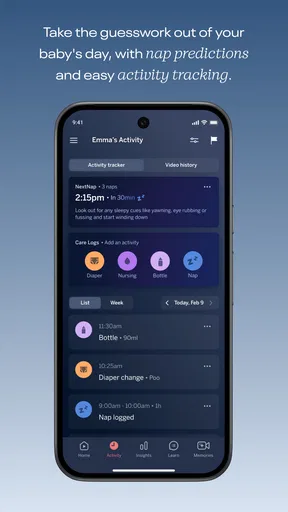
Imagine you are making dinner while your baby is resting in the nursery and another adult is handling the next check-in. A sound or motion alert draws your attention, so you open the app, look at the camera, and decide whether the baby seems to need you or has simply stirred. Later, you can review the sleep record rather than trying to remember exactly when the nap began. That is a modest workflow, but it can reduce the mental effort of keeping every detail in your head.
For a household with several caregivers, the most helpful use may be shared understanding rather than constant surveillance. If one person handles mornings and another takes evenings, a consistent record can make handovers more concrete: what happened during the nap, whether bedtime shifted, and what the next caregiver should expect. I would still keep handovers conversational, because a screen cannot capture every detail about mood, feeding, or what soothed the baby.
Compared with a basic audio monitor, Nanit offers a richer visual and sleep-tracking experience, but that extra depth brings more setup and a greater temptation to check the app. Compared with a simple camera feed, its appeal is the added sleep-focused view and coaching. Parents who prefer minimal technology may find an audio-only monitor more relaxing, while parents who want a record to review may appreciate the additional context here.
When the experience feels less reassuring
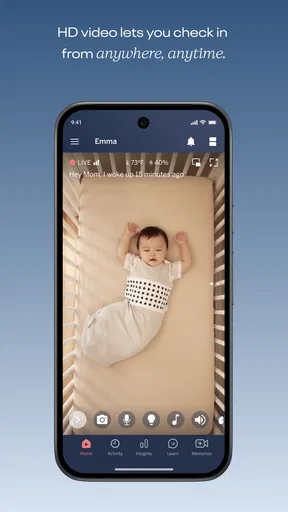
Using Nanit is like having a helping hand that’s as gentle as it is effective. The interface is intuitive and easy to navigate, even for the most tech-averse parents. The visuals are crisp, and the video quality from the camera is excellent, even in night vision mode.
Still, a camera-based setup is not the right fit for everyone. You need the Nanit camera as part of the experience, and the optional purchases can make the commitment more substantial than the free download suggests. If you only want a basic way to hear your baby, or you do not want another connected device to manage, a simpler monitor may be the better choice. I’d also skip the sleep dashboard if checking numbers tends to make you more anxious rather than more informed.
The app also keeps updating with new features and improvements, which shows the developers are keen on providing the best experience possible. Nothing feels static, and that’s something I truly appreciate in an app.
One common source of confusion is expecting the app to answer every question about why a baby woke up. Its job is to show and organize information, not explain every cause. Another is assuming that an alert always calls for immediate intervention. I’d use the live view and sound to understand the moment, then make a calm decision; the notification itself is a cue to check, not a verdict.
Choosing the next step
In a word, yes. While Nanit comes with a price tag, the peace of mind it provides is priceless. For parents struggling with sleep issues, this app is a sanity saver. It’s not just about tracking; it’s about empowering you with the information you need to make informed decisions about your child’s sleep.
Overall, Nanit is more than just an app; it’s a lifeline for new parents. It brings a sense of calm amidst the chaos of parenthood, making it a must-have in my book. Whether you’re a first-time parent or a seasoned pro, having Nanit in your corner is like having a sleep expert by your side 24/7.
So, if you’re ready to take control of your baby’s sleep and, by extension, your own sanity, give Nanit a try. Sweet dreams are just a download away!
My more measured recommendation is to begin with one question you want the app to help answer, then give yourself time to learn its camera view, alerts, and sleep summaries before deciding whether the extra detail is genuinely useful. Parents who enjoy reviewing routines and want a connected nursery monitor are the clearest fit. Those who need only a simple sound check, dislike screen-based tracking, or would rather avoid the extra equipment and purchases may be happier with a basic alternative.
Pros
- High-quality video streaming for clear monitoring.
- Temperature and humidity sensors for room comfort.
- Two-way audio for easy communication.
- Sleep tracking and analytics for insights.
- Portable stand makes it travel-friendly.
Cons
- Requires subscription for advanced features.
- Limited to Wi-Fi connectivity.
- Occasional app crashes reported.
- Setup can be time-consuming.
- Pricey compared to other monitors.
FAQs for Nanit
What features does the Nanit app offer for baby monitoring?
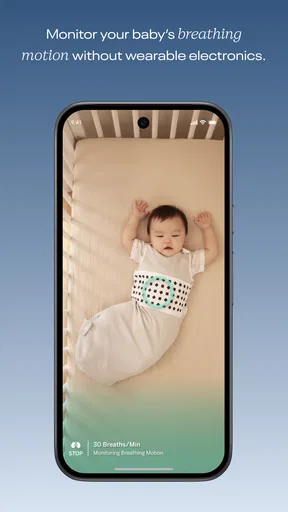
The Nanit app provides a range of features including HD live streaming, sleep tracking, and breathing motion monitoring. It also offers personalized sleep coaching based on your baby's sleep patterns and insights. Additionally, it includes temperature and humidity sensors to ensure the nursery environment is optimal for your baby.
Is the Nanit app compatible with all smartphones?
The Nanit app is compatible with most Android and iOS devices. However, it requires a stable internet connection for optimal performance. It's advisable to check the specific version requirements on the app's download page to ensure compatibility with your smartphone model and operating system.
How secure is the Nanit app when it comes to privacy?
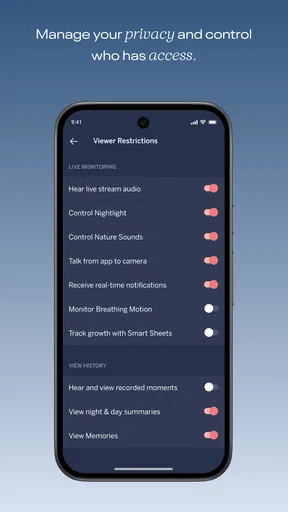
Security is a priority for the Nanit app. It uses advanced encryption protocols to protect your video streams and data. Additionally, it allows you to control who can access the camera feed by setting permissions. Regular updates ensure that the app maintains high security standards to protect user privacy.
Does Nanit require a subscription for full functionality?
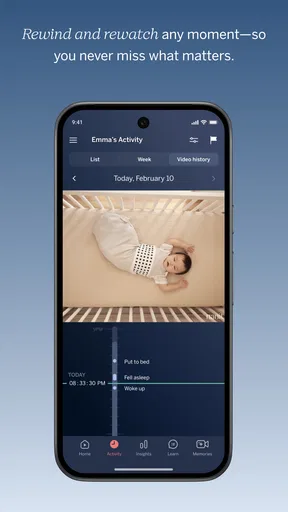
While the Nanit app offers basic features for free, a subscription is required to access advanced features such as detailed sleep analysis, video history, and insights. The subscription can be purchased directly through the app, and various plans are available to suit different needs and budgets.
Can the Nanit app be used with multiple cameras?
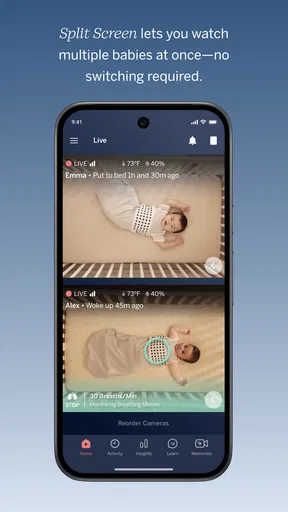
Yes, the Nanit app supports multiple cameras, allowing you to monitor different rooms or babies simultaneously. This feature is particularly useful for parents with more than one child. The app seamlessly integrates feeds from various cameras, providing a comprehensive monitoring experience.


